

Is your Motorola Edge 50 Pro not turning on, stuck in bootloop, or showing signs of a corrupted bootloader? If the device is bricked due to a failed firmware update, flashing error, or UFS partition corruption, this tested UFS Dump File read via Easy-JTAG can help you restore it.
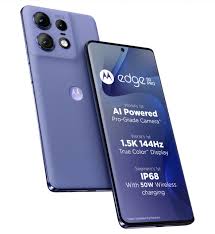
This file is essential for dead boot recovery, UFS repair, and restoring critical partitions using hardware tools like Easy-JTAG Plus, UFI Box, or similar UFS programmers. It has been successfully read and tested from a working Motorola Edge 50 Pro unit.
🔧 Device Hardware Specifications:
-
Model Name: Moto Edge 50 Pro
-
Code Name: Unknown (update if available)
-
Chipset / CPU: Qualcomm Snapdragon 7 Gen 3
-
CPU Type: 64-bit Octa-core (1x2.63 GHz + 3x2.4 GHz + 4x1.8 GHz)
-
GPU: Adreno 720
-
Storage Type: UFS 2.2 / 3.1
-
RAM Options: 8GB / 12GB
-
Internal Storage: 128GB / 256GB / 512GB
-
Battery: 4500 mAh with 125W wired + 50W wireless charging
-
Boot Mode for Flashing: Qualcomm EDL Mode (9008)
🛠️ When Should You Use This Dump File?
-
Device is completely dead, not responding to power button.
-
Stuck in Qualcomm HS-USB QDLoader 9008 mode (EDL).
-
After incorrect or interrupted firmware flashing.
-
No boot / no recovery / no fastboot access.
-
Critical UFS partitions like bootloader, abl, modem, or persist are damaged.
-
IMEI and network errors after flashing ROM or rooting.
⚠️ Caution Before Flashing:
🔴 Important: Always try to backup IMEI and security partitions (EFS, modemst1/2, persist) before flashing.
Flashing the dump file without backup could cause IMEI loss, resulting in No Network or Null IMEI.
✅ Flashing Instructions:
-
Open the phone carefully and identify UFS ISP pinout (if available), or use UFS socket adapter.
-
Connect your Easy-JTAG, UFI, or other UFS-supported tool.
-
Load the dump file in the software.
-
Flash required partitions or perform a full UFS dump restore.
-
Recheck with multimeter for shorts before powering ON.
-
Optionally reflash official firmware via fastboot or Rescue Tool for final restore.
📥 Download Now:
🔗 Moto Edge 50 Pro UFS Dump File – Free Download (TechFixForum)
Use this file for professional repair only. This dump is intended for experienced mobile technicians who understand UFS repair processes. For further help, visit TechFixForum.com.